Flywheel Core 22.3
22.3.0
FEATURES
Tasks Manager
Verification Workflow
Trial Coordinators using Tasks Manager can now clone a completed Read task and carry the original form responses forward as pre-filled values. This supports a verification workflow, in which a designated verifier independently reviews, edits, and submits the form, taking ownership of any fields they change. The audit trail records exactly which fields were modified, so each participant's contribution remains clearly identifiable for compliance purposes. Cloning is available for standalone Read tasks; adjudication tasks and their associated Reader Tasks are out of scope.
Adjudication Workflow
Adjudicators can draw measurements while reviewing an adjudication task in the Viewer but are now warned that those measurements will not be saved with their task, unless they specifically chose to perform their own read.
The adjudication comparison form now hides conditional-visibility questions that neither reader answered, showing only the questions relevant to the readers' responses.
Viewers
V3 Viewer
3D Segmentations
The Viewer now includes a Freehand tool for creating segmentation regions of interest (ROI). This offers an alternative to the brush tool that requires painting an entire region, and allows more precise delineation, particularly along edges.
ETDRS Grid for Ophthalmology
Users viewing Color Fundus and Fluorescein Angiography (FA) images (or any DICOM image with the OP modality) can now overlay the standard ETDRS (Early Treatment Diabetic Retinopathy Study) grid to support qualitative and quantitative assessment of retinal lesions.
The grid consists of 9 standard subfields, with the outer, middle, and inner circles' diameters measuring 7.2 mm, 3.6 mm, and 1.2 mm respectively. The grid also includes the foveal avascular zone (FAZ) reference circle with a diameter of 720 microns.
Users can move and rotate the grid to ensure it is centered on the fovea and aligned with the optic nerve head for accurate assessments.
Users can save the position of the grid, allowing a grader reviewing another grader's assessment to see exactly how the grid was positioned.
Note
The diameters for the grid's circles and the visibility of the FAZ reference circle will be configurable in a future release.
UI/UX Improvements in the Measurements Panel
The measurements panel has been refined to reduce visual clutter. Hover pop-overs no longer appear over labels or over annotation, length, bi-directional, angle, and freehand measurements. Pop-overs only remain for area measurements, but now appear after a longer hover delay.
Data Transfer
Pre-zipped DICOM Import
Flywheel now applies its full DICOM processing to pre-zipped DICOM data, so archives that were previously treated as opaque files receive the same handling as loose DICOM files.
-
The browser-based upload interface now de-identifies pre-zipped DICOM files (
.dcm.zipor.dicom.zip) and uploads them as a tar archive. Previously, pre-zipped DICOM files uploaded through the browser skipped de-identification, header processing, and metadata extraction. -
The command-line interface (CLI) local import feature now supports pre-zipped DICOM files. When a user imports a ZIP archive containing DICOM files, the CLI extracts the DICOM files, removes protected health information, and packages the de-identified files into a tar archive before uploading them. This removes the need to manually unzip pre-zipped DICOM data before import.
-
Flywheel now correctly sets the
zip_member_countfield for pre-zipped uploads to reflect the number of files contained in the archive. Previously, this count was set only for archives that Flywheel created during import.
External Storage
Administrators can now configure external Azure storage connections using client credentials (client_id, client_secret, and tenant_id) as an alternative to access keys. This credential-based authentication method aligns with recommended Azure security practices and gives administrators an additional option for connecting Flywheel to Azure storage.
Rule Sets
Import and export rule sets now support label templates. Users can define labels that automatically incorporate details such as the job type, origin type, origin ID, and creation date, including custom date formatting. This makes it easier to generate consistent, descriptive labels for imported and exported data without manually specifying them each time.
Uploads
Uploads now retry individual chunks that fail to transfer, rather than restarting the entire file upload. This reduces the need to re-upload large files after a temporary network interruption.
Import and export operations in the CLI now treat skipped-file reporting as optional. Previously, every skipped file was automatically included in the report output. Users can now include this detail explicitly using the new --report-skip command-line argument, reducing report noise by default while still allowing users to view skipped-file details when needed.
Data Management
Flywheel now supports adjustable time limits for file downloads. Customers can request a longer limit when the default interferes with downloading large files (typically 500 GB or more).
Usage Reporting
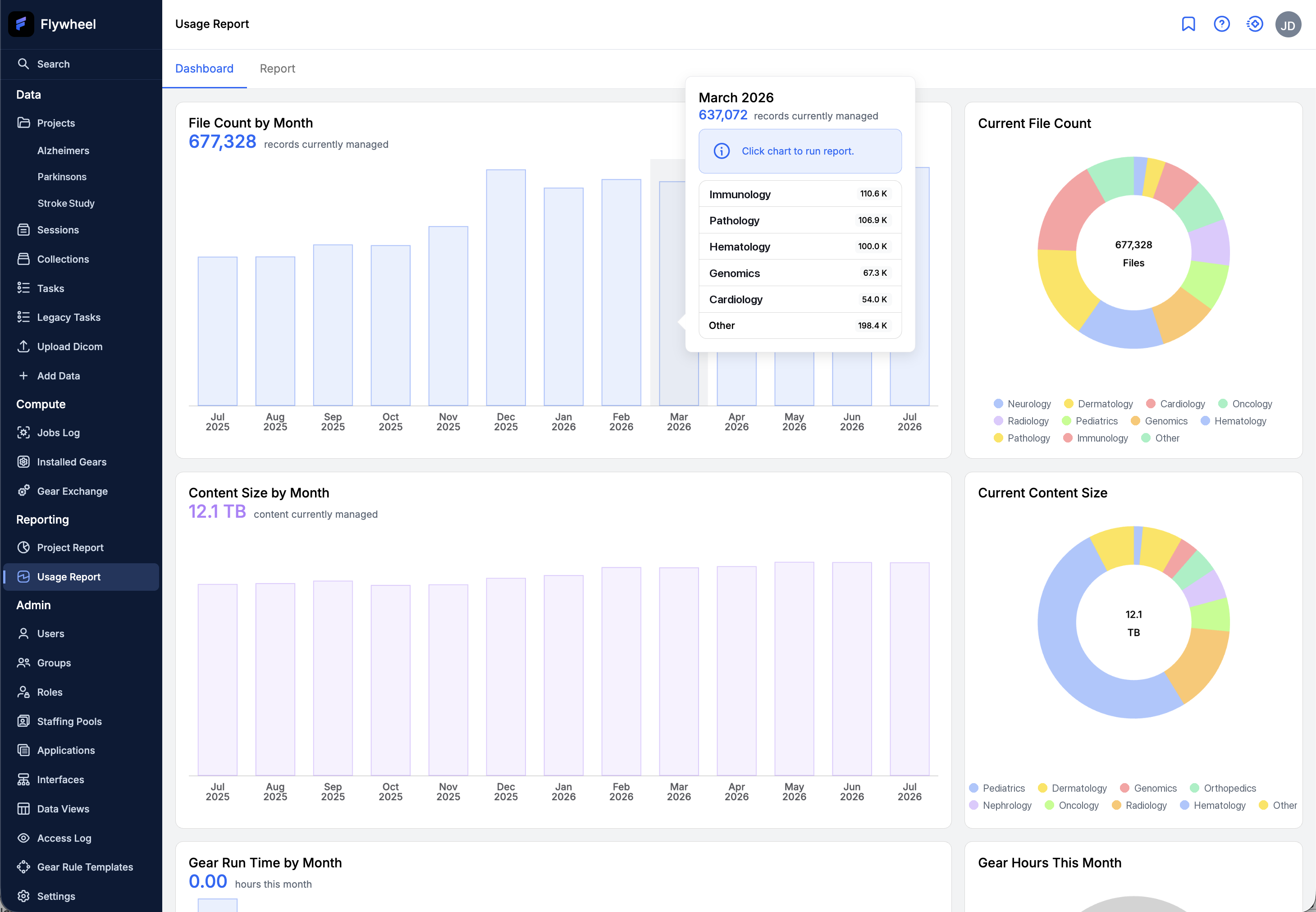
Flywheel enhanced Usage Reporting to give administrators a clearer view of resource consumption across their organization. The redesigned experience separates an at-a-glance dashboard from a detailed, exportable report:
- Interactive dashboard — displays file count, content size, and gear run time trends over time, with breakdowns by group.
- Detailed report view — lets administrators group results by project, group, or month, filter by date range and group or project, and save filter selections for reuse.
- Expanded metrics — reports now include an end-of-range value for files, content size, jobs, gear run time, and sessions, in addition to the change over each selected period.
- Flexible export — administrators can export the report as a comma-separated values (CSV) file, choosing between a standard set of columns or the full set of available data columns.
FIXES
Viewers
V2 Viewer
- Fixed an issue where a NIfTI segmentation mask generated from an analysis failed to display over its corresponding NIfTI image when that image was loaded from an analysis container rather than an acquisition.
V3 Viewer
-
Fixed an issue where scroll position did not stay synchronized between datasets when one or more series lacked a valid
FrameOfReferenceUIDor had mismatchedFrameOfReferenceUIDvalues. Scrolling now stays synchronized when datasets share the sameImagePatientPositionandImageOrientationPatientvalues. -
Fixed an issue where opening a file-level task for a file that had been deleted displayed a blank screen. Users now see appropriate information when the file no longer exists.
-
Fixed an issue where selecting a measurement set in the measurement panel caused the viewport to jump to a different slice unexpectedly.
Adjudication Tasks
-
Fixed an issue in Adjudication where users could still proceed with their task even when some datasets could not be loaded, for example due to file corruption or invalid file types. Users now get a full-page error and are prevented from completing the task.
-
Fixed an issue where hovering over or selecting a reader in the adjudication comparison table caused measurements from another reader to remain highlighted in the viewport at the same time. Only the measurements belonging to the selected reader are now highlighted.
-
Fixed an issue where clicking a reader's column or avatar did not correctly activate that reader's measurement set, and hover states did not consistently highlight the corresponding measurements across viewports.
BrainBrowser
- Routine updates to viewer dependencies. See the BrainBrowser documentation for updated installation instructions.
Montage Viewer
- Framework upgrade and routine updates to viewer dependencies. See the Montage Viewer documentation for updated installation instructions.
Tasks Manager
-
Fixed an issue where adjudicators could see the names of the readers who completed the associated reading tasks on the adjudication task card, breaking the blinding required for the adjudication workflow.
-
Fixed an issue where users could not update the status of tasks associated with deleted projects, which returned the error
Unable to load notification.Tasks orphaned by container deletion are now automatically cancelled, and the task displays an alert indicating why. -
Fixed an issue where the Create Protocol button did not appear for site administrators who lacked specific write permissions for the group. The button now appears correctly for site administrators.
-
Fixed an issue where viewer configuration settings in the protocol editor — including file browser options, toolbar display, and label behavior — failed validation due to a mismatch with the expected format. Viewer configuration settings now validate correctly within protocols.
-
Fixed an issue where users could bypass restrictions on unavailable protocol types by typing directly into the type field of the create protocol dialog. Only supported protocol types can now be selected.
-
Fixed an issue where the e-signature badge in tasks required a click to reveal signature details. The badge now shows details on hover.
-
Fixed an issue where the adjudication trigger fields were not highlighted with distinguishing colors in the comparison form when a newly created adjudication task was launched. The trigger fields are now clearly highlighted.
-
Fixed an issue where submitting a task could fail during form validation when the form used the
someoperator, returning the errorUnrecognized operation some. Forms that use thesomeoperator now validate and submit consistently.
Gears and Compute
-
Fixed an issue where the
FW_XFER_STORAGE_CREDSenvironment variable did not appear when listing environment variables in a JupyterLab workspace configured for external storage, which could prevent the workspace from connecting to its configured external storage. -
Fixed an issue where graphics processing unit (GPU) jobs could fail with an
InsufficientInstanceCapacityerror when the requested Amazon Web Services (AWS) availability zone temporarily lacked capacity. Flywheel now retries the request in other configured availability zones before falling back to an alternate instance type. -
Fixed an issue in the Gears Manage Access dialog where the project and user dropdown lists remained open after adding a project. The dropdown lists now close as expected.
-
Fixed an issue in the Gears Manage Access dialog where removing a project from the access list prevented it from being re-selected in the project dropdown.
-
Fixed an issue in the Gears Manage Access dialog where searching for a user by email address returned no results even when a matching user existed.
-
Fixed an issue where the Gear Rules page crashed and generated over 1,000 console errors when reloaded while certain browser extensions that modify page content were enabled.
-
Fixed an issue where uploading large gears could exhaust server memory and cause the upload to fail. Large gear uploads no longer strain backend resources.
Data Management
-
Fixed an issue where a session weight of
0did not display in the user interface. A weight value of0now renders correctly. -
Fixed an issue where tooltips in the search results table were inconsistent across tabs. Tooltips now display consistently across all tabs in search results.
-
Fixed an issue where clicking the active Sessions or Subjects tab within a project deselected the current session or subject. Clicking the active tab no longer clears the selection.
-
Fixed an issue in Session Templates where the Save button remained disabled when the Session Label field was left empty, even though the field is optional. An empty Session Label matches any or all sessions in a project, and the Save button now enables correctly in this case.
Data Transfer
-
Fixed an issue where the DICOM connector service failed to start in some Flywheel-hosted environments because it referenced an incorrect Transport Layer Security (TLS) certificate secret name, producing the error
secret "flywheel-tls" not found. -
Fixed an issue on Amazon Elastic Kubernetes Service (EKS) deployments where a network policy misconfiguration in the connector service blocked internal service-to-service traffic, which could prevent data transfer operations from completing.
-
Fixed an issue where de-identification failed during import if a DICOM date (DA) field contained multiple values, producing an error such as
Unable to parse date field with format %Y%m%d. -
Fixed an issue where a site's default classification rule set could unexpectedly revert to a mixed configuration after an upgrade instead of remaining as configured.
-
Fixed an issue where data exports that included files with no content (0 bytes) could stall or fail to complete. The export process now skips these empty files, reports them with the reason
zero-byte file, and finishes successfully. -
Fixed an issue where the
fw ingestcommand failed with anot enough permissionserror for users who had full upload permissions, on sites running version 22.0 or later. -
Fixed an issue where the CLI crashed with a
UnicodeDecodeErrorwhen monitoring import progress for data containing accented or other multi-byte characters in labels. -
Fixed an issue where users without the site-admin role received a confusing, technical error message when creating or updating storage locations using the CLI. The CLI now checks permissions before running admin storage commands and displays the message
admin commands require site-admin role, while thestorage listandstorage getcommands no longer require site-admin access. -
Fixed an issue when resolving import conflicts using the "Keep all" action, where the "Resolve conflict" button remained disabled on the next page of conflicts. The button now enables automatically when the next page loads.
-
Fixed an issue where clicking a conflict indicator on the imports page navigated to the import details page instead of the conflicts page.
-
Fixed an issue where an ad hoc filter during export failed to return valid matching options in the suggestion list after a value was typed, preventing users from selecting a filter value.
-
Fixed an issue where configuration dialogs — including those for storage providers, connectors, and rule sets — closed when a user clicked outside the dialog, causing accidental loss of in-progress data. These dialogs no longer close on an outside click.
-
Fixed an issue where text box fields could not have their disabled state changed and remained disabled regardless of the intended setting.
-
Fixed inconsistent padding in the Rule Set Group table, improving visual consistency in the Gear Rules interface.