Running Gears as a Batch
This document provides information on executing a gear on multiple datasets by using Batch Run Gear action.
How do I run a gear on multiple sessions or acquisitions at the same time in Flywheel?
Executing a gear on multiple datasets at once is done by using the "Batch Run Gear" action. When viewing data on the Session Dashboard, you can select entire sessions, or specific acquisitions within a session, on which you want to run a Gear.
Under the Actions menu, select the Batch Run Gears option. A modal then asks you to select the gear type and then you can select from the gear you want from the list of those available on your site. You then are able to choose the version of the gear and set any configuration options available for that gear.
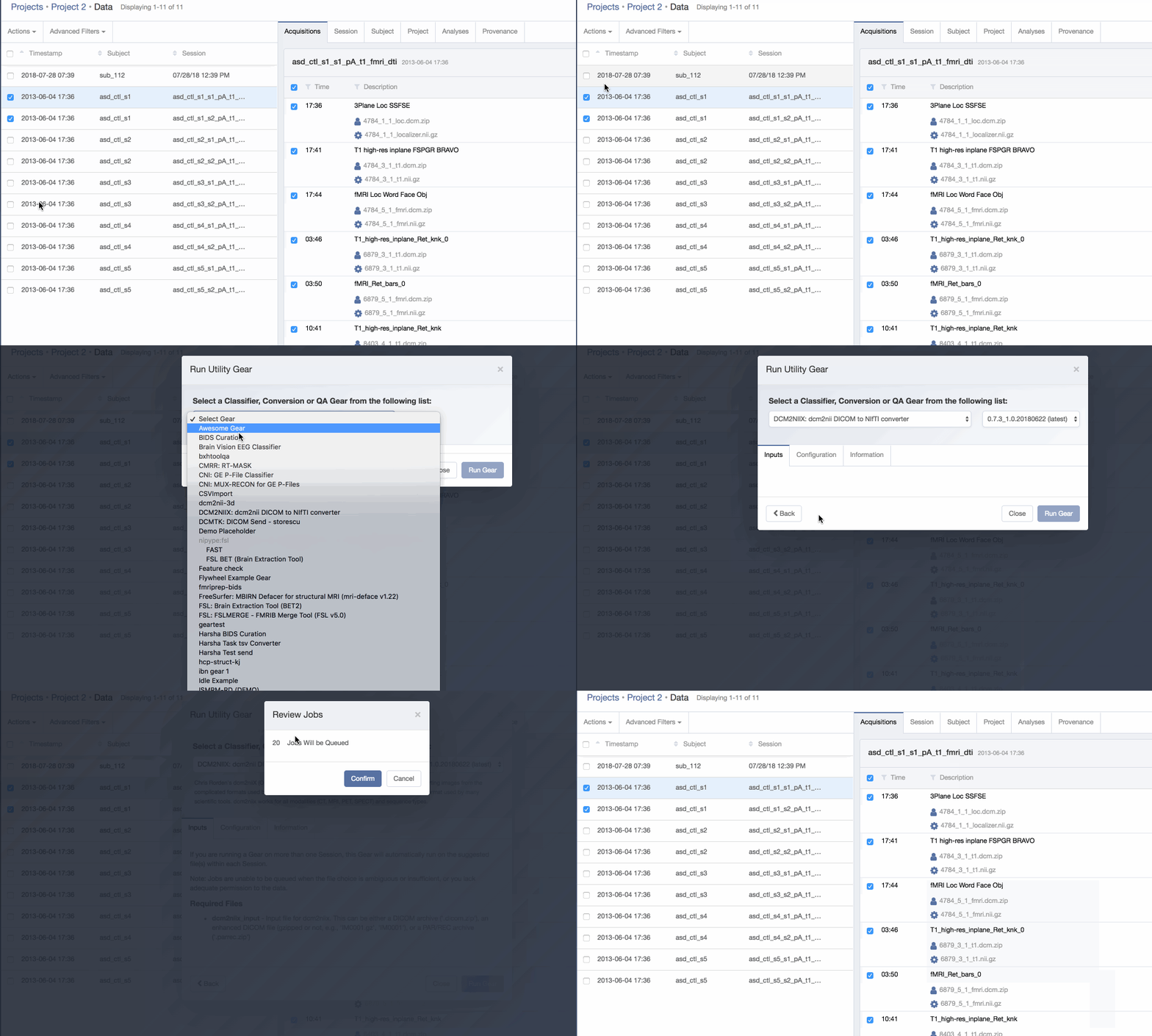
When running batch gears from a session, use the Execution Level dropdown to select whether each gear job runs at the session level or the acquisition level. Select Session to queue one job per selected session, or Acquisition to queue one job per matching acquisition within each selected session. See How is the number of jobs queued determined? and Session-level execution for details on how each level affects job behavior.
After pressing the Run Gear button, you are then notified how many jobs of that gear you are starting based on the datasets you selected. Selecting 'Confirm' pushes these jobs into your site's job queue and their progress will appear on the provenance tab.
How is the number of jobs queued determined?
When running at the acquisition level, each acquisition container is evaluated for matches to the specified Gear inputs. Flywheel will examine the files within each acquisition container and queue a job for each acquisition that has exactly one file that matches each type of expected inputs, as determined by the Gear's manifest. If the acquisition has multiple files that match a given input file's type, or if multiple inputs require a file of the same type, a job will not be queued for that acquisition.
For example, for a Gear that has a single input and expects a NIfTI file (as indicated by the Gear author in the Gear's manifest) the Batch Job Resolver will look at each acquisition to find those which have a single NIfTI file - matching the file type of the input. Note that to avoid ambiguity there should only be a single NIfTI file in that acquisition - acquisitions with multiple matches for a given Gear input will not run, as which file to choose as input is ambiguous in that case.
Session-level execution
When running at the session level, Flywheel queues a single job per selected session. The destination container for each job is set to the session, regardless of which acquisitions are selected.
This is the recommended execution level for SDK-enabled gears with no inputs specified in the manifest, where the gear itself determines which acquisitions and files to process at runtime.
When executed at the session level, the config.json file provided to the Gear at runtime will contain the following information (example assumes no configuration options):
Why does batch run not queue my job?
If there are no files of the expected type (as indicated by the Gear author in the Gear's manifest) found in the acquisition, Flywheel will not be able to queue a job for that acquisition. Also, If the acquisition has multiple files that match a given input file's type, or if multiple inputs require a file of the same type, a job will not be queued for that acquisition. This is because the Batch Resolver cannot logically determine which file is to be used as input when multiple matches exist in the same acquisition container.