Form Technical Reference
The Protocol Form is how you can create questions for your tasks. These could be used to accompany any type of task, like reader studies.
Simple Form JSON
Form Properties
| Property | Description | Value | Required |
|---|---|---|---|
| title | The title of the form, not currently shown in the viewer. | String | yes |
| description | The description of the purpose of the from, not currently shown in the viewer. | String | yes |
| defaults | This is an object that is in the format of the answers we expect to get back from the questions, where the field key is a property and the value is the default (starting) state of the answer. The type of primitive the answer is expected to be is inferred from the value. e.g. "" = String, [] = Array, false = boolean | Object of Key/Value pairs | yes |
| fields | The collection of questions to be answered. See Field Properties below. | Array of Fields | yes |
Note: defaults does not need to include all of the field key's just the ones that you are expecting values for. Most likely you will skip paragraph and instruction types in your defaults object.
Example Field
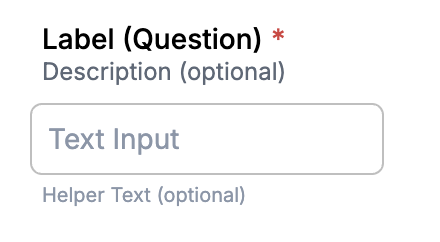
Field Properties
| Property | Description | Value | Required |
|---|---|---|---|
| key | unique name to map a question the the entered value. Also used as the var identifier for the [JsonLogic](https://jsonlogic.com/) visibility and validity. | String | yes |
| type | this identifies what type of field format will be used to answer the question. | 'paragraph', 'instruction', 'text', 'text-area', 'select', 'checkbox', 'radio' | yes |
| label | This is the label used to ask the question. | String | no (but may look weird) |
| description | Some optional text you may want to display under the label. | String | no |
| helperText | Optional label to put under the field input, quite often used for example answers | String | no |
| options | If you have a collection field this where you would make the collection of choices that would be presented. | Array of Value/Label objects \[{"value": "1", "label": "One"}\] | if type is 'select', 'checkbox', or 'radio' |
| visible | The [JsonLogic](https://jsonlogic.com/) rule to determine if the field is visible | Array of JsonLogic RulesLogic or Boolean | no, not specified assumes visible |
| requiredWhenVisible | If the field is visible whether or not it is required to have a valid value. If true this will also show a red asterisk indicator next to the question label. (see above image) | Array of JsonLogic RulesLogic or Boolean | no, not specified assumes not required |
| validation | See Validation Rule Properties below | Array of Validation Rule Objects | no, not specified assumes no validation run |
Validation Rule Properties
| Property | Description | Value | Required |
|---|---|---|---|
| logic | The JsonLogic rule to determine if the field value is valid | JsonLogic RulesLogic | yes |
| message | Message to show if the RulesLogic is not met | String | no (but may be hard to understand the validation failure without it) |
As you can see from above a key component of the interactivity in the validation and visibility logic used in a form is handled via an array of JsonLogic rules. For both the visible and requiredWhenVisible rules collection if any of the rules are true then the whole set evaluates to true. The validation collection works slightly different in that if any of the logic evaluates to false it will show the message and that field is consider invalid.
Validation and Visibility Sample Form
When adding logic to your form it is always best to use affirmative based logic like shown above in the Validation and Visibility Sample Form with the use of "===" or "in". Using something like "!==" : [var, "2"] does not take into account empty values or other defaults that may be set. Negative logic also becomes a lot more complex to follow when one starts to add logical conjunctions in the mix.
Note: If requiredWhenVisible is false and the value is empty validation does not run. If you have a use case where you want to conditionally allow empty value based on another field then you would have to make requiredWhenVisible a JsonLogic Rule and add and empty check to your validation.
Logical conjunctions like "and", "or" can be used to string more complex logic together based on multiple values or fields. This logic also becomes necessary for when multiple sub-rules are need as only one top level rule can be used.
Conjunction example
Full Text Example Form Look in Viewer
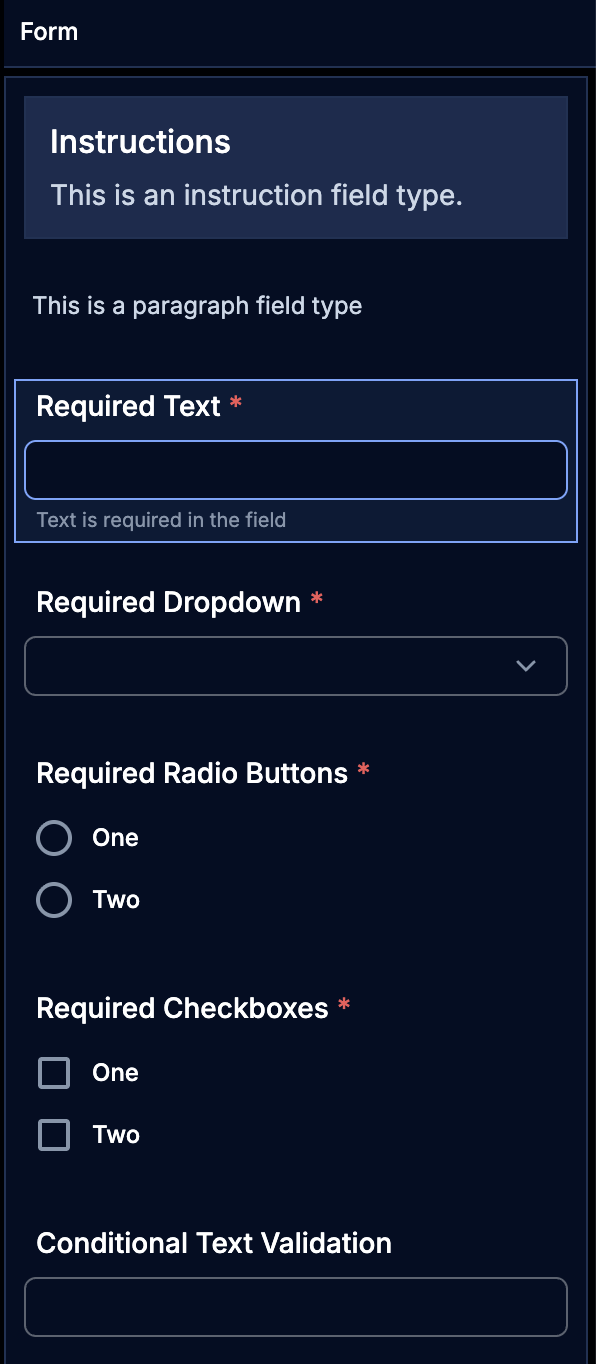
Full Test Example Form JSON
1 2 3 4 5 6 7 8 9 10 11 12 13 14 15 16 17 18 19 20 21 22 23 24 25 26 27 28 29 30 31 32 33 34 35 36 37 38 39 40 41 42 43 44 45 46 47 48 49 50 51 52 53 54 55 56 57 58 59 60 61 62 63 64 65 66 67 68 69 70 71 72 73 74 75 76 77 78 79 80 81 82 83 84 85 86 87 88 89 90 91 92 93 94 95 96 97 98 99 100 101 102 103 104 105 106 107 108 109 110 111 112 113 114 115 116 117 118 119 120 121 122 123 124 125 126 127 128 129 130 131 132 133 134 135 136 137 138 139 140 141 142 143 144 145 146 147 148 149 150 151 152 153 154 155 156 157 158 159 160 161 162 163 164 165 166 167 168 169 170 171 172 173 174 175 176 177 178 179 180 181 182 183 184 185 186 187 188 189 190 191 192 193 194 195 196 197 198 199 200 201 202 203 204 205 206 207 208 209 210 211 212 213 214 215 216 217 218 219 220 221 222 223 224 225 226 227 228 229 230 231 232 233 234 235 236 237 238 239 240 241 242 243 244 245 246 247 248 249 250 251 252 253 254 255 256 257 258 259 260 261 262 263 264 265 266 267 268 269 270 271 272 273 274 275 276 277 278 279 280 281 282 283 284 285 286 287 288 289 290 291 292 293 294 295 296 297 298 299 300 301 302 303 304 305 306 307 308 309 310 311 312 313 314 315 316 317 318 319 320 321 322 323 324 325 326 327 328 329 330 331 332 333 334 335 336 337 338 339 340 341 342 343 344 345 346 347 348 349 350 351 352 353 354 355 356 357 358 359 360 361 362 363 364 365 366 367 368 369 370 371 372 373 374 375 376 377 378 379 380 381 382 383 384 385 386 387 388 389 390 391 392 393 394 395 396 397 398 399 400 401 402 403 404 405 406 407 408 409 410 411 412 413 414 415 416 417 418 419 420 421 422 | |